
Most of my client requests come through WhatsApp and email. I used to rewrite everything manually before starting. Text2Task turns those messages into a clear project with tasks. It’s simple, useful, and saves me time.
Turn client messages into organized projects and tasks—without retyping.
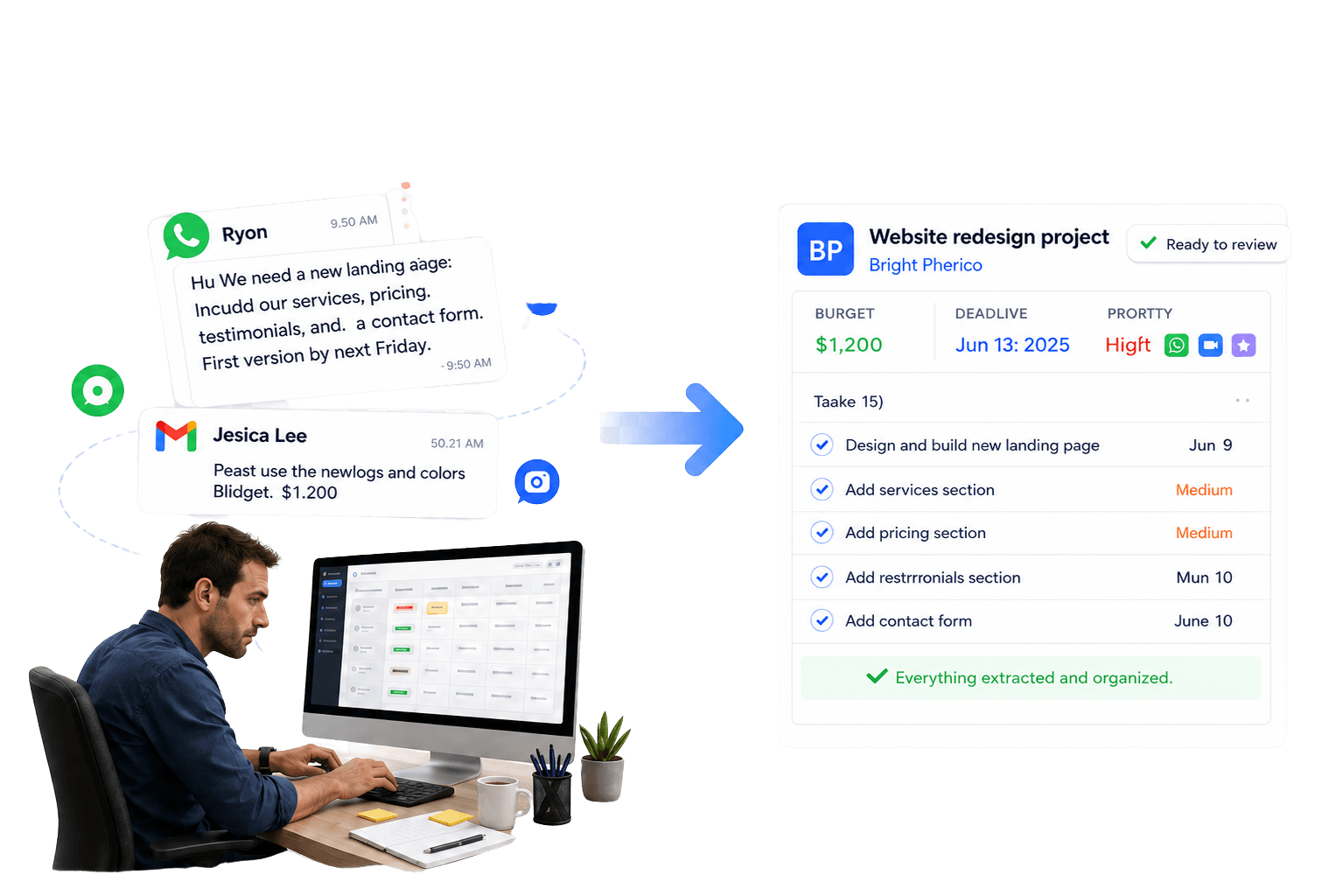
Paste an email, WhatsApp message, note, or screenshot. Get a reviewable project draft with tasks, deadlines, priorities, and budget—before anything is saved.
No signup for the demo · No inbox connection · Review before saving
LIVE DEMO · NO SIGNUP
Try Text2Task live — no signup
Paste a client request and see the organized project draft in seconds.
You stay in control
NO INBOX CONNECTION REQUIRED
You choose what to paste or upload. Text2Task doesn't need access to Gmail or WhatsApp.
REVIEW BEFORE SAVING
Nothing is added to your workspace until you approve it.
NOTHING CHANGES AUTOMATICALLY
Suggested updates stay optional until you approve them.
CUSTOMER SUPPORT
Get help from a real person at support@text2task.com.
What early users say
Text2Task saves me a lot of time as a project manager. It turns client messages into clear tasks, and I can quickly review everything before adding it to the project. It’s simple to use and helps me stay organized.
See the complete workflow
See a client request move from message to reviewed project and organized tasks.
- 01
Paste or upload a request
Text2Task reads the request and identifies the work.
- 02
Review the project
Check the tasks, budget, deadline, priority, and client details.
- 03
Edit and save
Nothing is saved until you approve it.
Client requests are already written. Why are you typing them again?
Requests arrive through WhatsApp, email, screenshots, voice notes, and project briefs. Before the real work begins, someone still has to read everything, identify the tasks, find the deadlines and priorities, and enter it all into a CRM or task tool.
Text2Task turns that scattered information into a structured project draft you can review before saving.
- Stop retyping requests into your CRM
- Keep deadlines, priorities, and budgets visible
- Review everything before anything is saved
Everything you need after the first request
Manage projects, track tasks, review client updates, and keep the work connected in one workspace.
Track projects and tasks
Keep deadlines, priorities, budgets, and status easy to review.
Review client updates
See suggested changes and apply only what you approve.
Keep project history together
Review what changed and when.
Attach resources and notes
Keep relevant links, files, and notes with the project.
Plan client work on a calendar
Plan project deadlines and scheduled client work in one calendar.
Explore the Work CalendarShare progress with your client
Share selected status, tasks, and updates through a private link — nothing else in your workspace is shown.
Explore Client Project Tracker
Spend less time organizing client requests. More time doing the work.
See how freelancers, project managers, and small teams turn emails, WhatsApp messages, notes, and screenshots into organized projects and tasks.
Web Designers
Turn client website feedback, mobile fixes, copy changes, assets, deadlines, and budgets into reviewable tasks.
WordPress Freelancers
Turn plugin, Elementor, form, mobile, and content requests into reviewable WordPress maintenance tasks.
Graphic Designers
Turn revision notes, brand context, assets, and deadlines into a clear design task plan.
Social Media Managers
Structure posts, captions, campaign changes, approval notes, and content deadlines before production.
Project Managers
Turn stakeholder messages, meeting notes, scope changes, deadlines, approvals, and blocker notes into proposed projects and tasks you review before saving.
Small Agencies
Turn each website, creative, content, campaign, or approval request into reviewable project tasks for client delivery.
Start free. Upgrade when you need more.
Every plan includes the full Text2Task workspace. Pro adds unlimited extraction and CSV export.
Free
$0/month
- 30 total AI extracts
- Text and image extraction
- Review and edit before saving
- Project CRM workspace
- Client updates and history
- Resource attachments
- Deadlines, priorities, budgets, and status tracking
- Work Calendar
Create your workspace with Google or email. No credit card required.
Pro
$12.90/month
- Unlimited AI extracts
- Text and image extraction
- Review and edit before saving
- Project CRM workspace
- Client updates and history
- Resource attachments
- Deadlines, priorities, budgets, and status tracking
- Work Calendar
- CSV export
Create your account and continue to checkout.
Questions before you start
Clear answers about turning client requests into projects, reviewing changes, and getting started free.
Do I need to connect WhatsApp or Gmail?
No. Paste the message or email into Text2Task, or upload a screenshot. Text2Task does not need access to your inbox or WhatsApp account.
Can Text2Task read screenshots?
Yes. Upload a screenshot or image of a client request, then review the extracted project details and tasks before saving anything.
Can I edit the project before saving it?
Yes. Text2Task creates a reviewable draft. You can edit the project details and tasks before anything is saved to your workspace.
Does Text2Task change my projects automatically?
No. You stay in control: Text2Task suggests the revisions, and only the changes you approve are applied.
What happens after my 30 free extracts?
New AI extraction pauses after you use all 30 free extracts. Your saved workspace remains available, and you can upgrade to Pro for unlimited text and image extraction.
Do I need another project-management tool?
Not necessarily. Text2Task includes a built-in project CRM for projects, tasks, deadlines, priorities, client updates, history, and resources. It does not automatically sync with external tools.
Turn your next client message into an organized project—without retyping.
Start free with 30 AI extracts included. Review and edit every project before saving.
30 free AI extracts. No credit card required.