
Work Calendar
A Project Deadline Calendar Built for Client Work
See project deadlines, schedule client work, and add manual events in one clear calendar—without losing the project and client context behind each date.
Project deadlines
Keep every project deadline visible
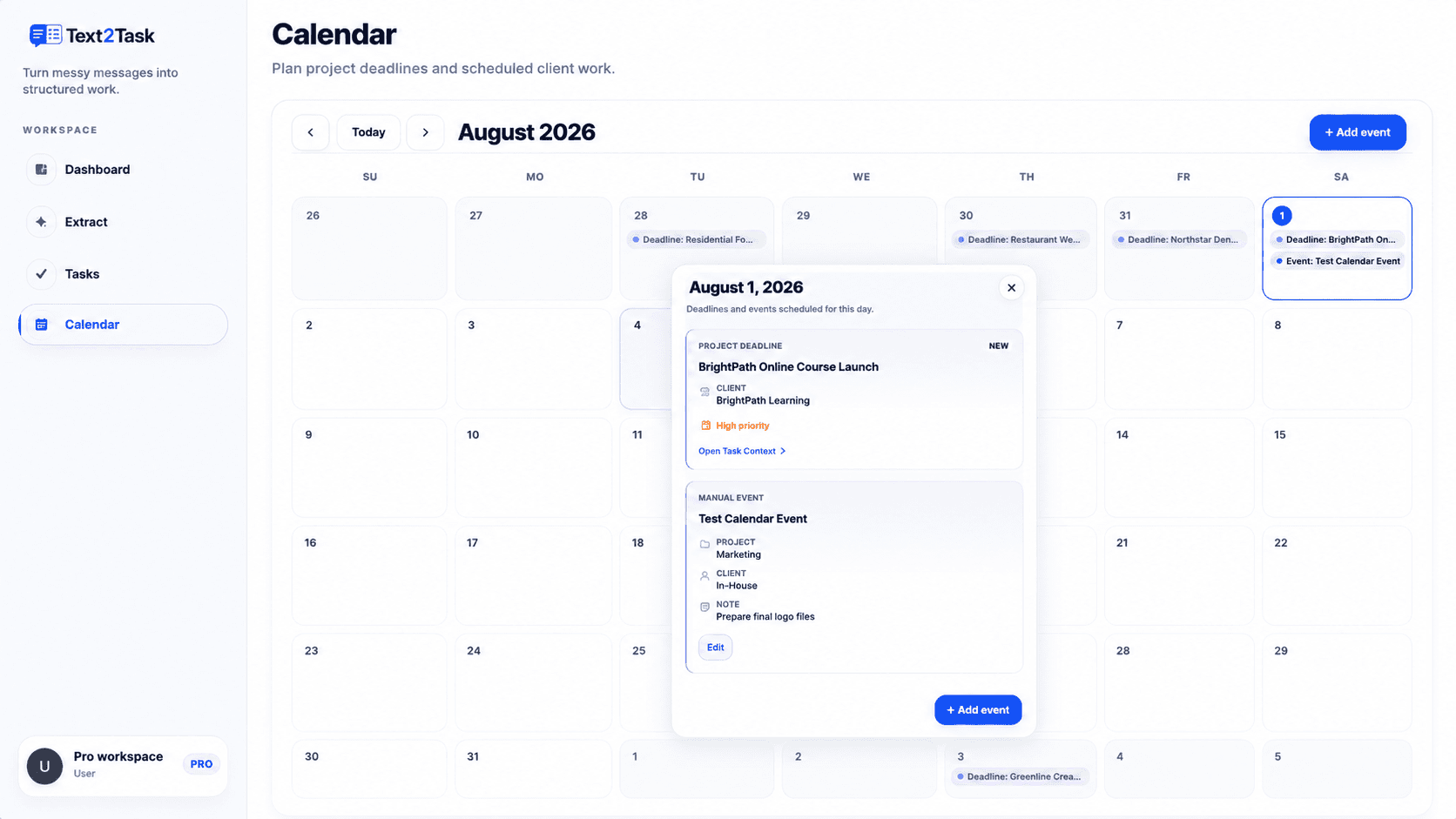
Project deadlines saved in Text2Task appear in the Work Calendar, giving you a clear month view of upcoming client work. Instead of checking projects one by one, you can see important dates together and open any day for more context.
- View project deadlines in one monthly calendar
- See the project, client, status, and priority behind a deadline
- Open the related task workspace when more detail is needed
Manual events
Schedule the work around each deadline
Add manual events for calls, reviews, handoffs, deliverables, or any client work that needs a specific date. Manual events live alongside project deadlines, so planning and delivery stay connected.
- Add a date, optional time, and notes
- Edit or remove manual events
- View deadlines and manual events together for the selected day
Projects and clients
Use an existing project—or enter a new name
Link an event to an existing Text2Task project and client, or type a new project or client name when the work is not yet in your CRM. Text2Task keeps linked records and custom names clear and separate.
- Search existing projects and clients
- Enter a custom project or client name
- Automatically use the linked project's client when applicable
Day-detail view
Open any day and understand what needs attention
Select a date to see its project deadlines and manual events in one focused view. Clear labels, status, priority, client details, notes, and direct actions help you understand the day without scanning the entire task list.
Who it’s for
Built for real client work
Plan client calls, reviews, revisions, and delivery dates.
Keep project deadlines and scheduled client work visible across active accounts.
Review important dates without opening every project separately.
Track review rounds, content handoffs, launches, and final delivery dates.
How it works
Plan client work in three steps
Add or update project deadlines
Add or update project deadlines in Text2Task.
Schedule client-work events
Schedule manual client-work events when needed.
Review the calendar
Open the calendar to review deadlines and events by day.
FAQ
Work Calendar questions
What is a project deadline calendar?
A project deadline calendar gives you one calendar view of your project deadlines and scheduled work, along with the project and client context behind each date.
Do Text2Task project deadlines appear in the calendar?
Yes. Deadlines saved on your Text2Task projects appear in the Work Calendar on their relevant date.
Can I add events that are not connected to an existing project?
Yes. A manual event can use an existing project and client, or a custom project or client name when the work is not yet in your CRM.
Can I edit manual calendar events?
Yes. Manual events can be edited or removed. Project deadline details continue to come from the related project or task workspace.
Does the Work Calendar work on mobile?
Yes. The Work Calendar includes a responsive mobile view and a day-detail dialog suited to smaller screens.
Turn project deadlines into a clear plan
Keep client work, important dates, and scheduled events visible in one organized workspace.